
SAP Liquidity Planner / Cashflow Analyzer
Actual Cashflow Reporting with SAP
Looking Back: Analyze Past Cashflows Easily and Precisely with SAP
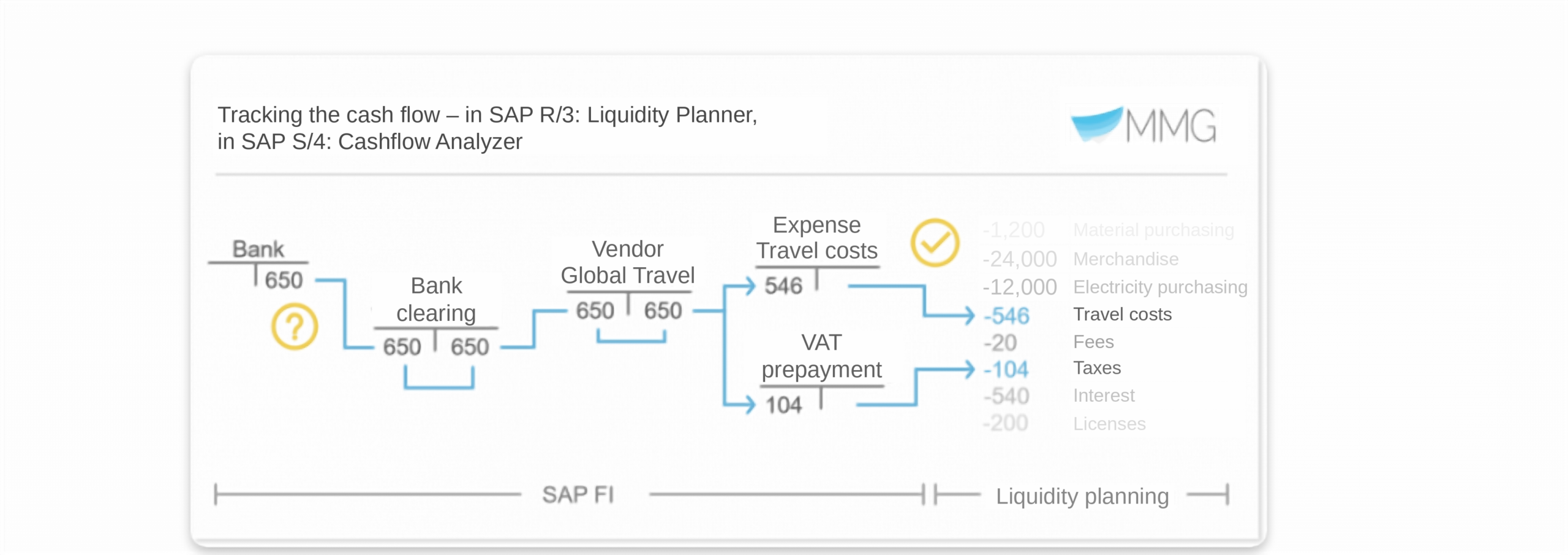
Analyzing cash flows down to the exact cent and day is standard functionality in Cashflow Analyzer (SAP Liquidity Planner in R/3). The analysis follows a clear principle, illustrated using an outgoing payment example. An outflow of EUR 650 is recorded on the bank account and posted in SAP FI to a bank G/L account via electronic bank statement processing.
The system tracks the posting through the document chain to identify the vendor invoice. This invoice was originally posted across G/L accounts for travel expenses and sales tax. SAP recognizes the underlying transaction structure and automatically assigns the total amount to the correct liquidity item within your reporting.
Performing this analysis manually in SAP FI would quickly reach operational limits with thousands of daily transactions. Once fully configured, SAP processes this task in seconds. This enables precise tracking of cash inflows and outflows on a daily basis, fully differentiated by currency
Expanding Actual Cashflow Reporting and Extracting Data
Once actual cashflow reporting is established, the main focus shifts toward extending the overall reporting scope. Typical implementation steps include evaluation by intercompany entities (IC companies), external debtors and creditors, profit centers, cost centers, business units, segments, and projects. In S/4HANA, these data points are evaluated automatically, while R/3 utilizes a standard user exit.
In SAP R/3, values generated by Liquidity Planner should be extracted into an external tool such as SAP Analytics Cloud. While reporting lists and drilldown capabilities in R/3 are extensive, native visualization options remain limited.
In S/4HANA, actual values are evaluated flexibly using the Fiori app Cashflow Analysis. Since actual data is regularly required to validate forecasts, data extraction is recommended in S/4HANA as well. SAP Analytics Cloud provides the most efficient platform for data evaluation, with options to export to external tools as needed.
Typical Project Flow: Prepare Concept, Set Up System, Optimize Allocations
Our projects in the area of Cashflow Analyzer or Liquidity Planner begin with a workshop to discuss your requirements and system setup. The results are documented in a technical concept, serving as a future reference and the foundation for implementation.
Following implementation, an initial rule set is stored in the system and applied to actual SAP data in the test environment. This allows you to quickly evaluate allocation performance and identify areas for optimization. You then refine rules so that SAP achieves a high automated allocation rate for your cash flows within days.
Once reached, application in the live SAP system is recommended to analyze up to date data. Fine tuning begins, resulting in fully automated actuals reporting. Activating forecast values and establishing target vs actual comparisons represent the logical next project phases.
SAP-Systemvoraussetzungen und nützliche Tipps
Our team has supported more than 30 clients in building actuals and forecast reporting. Key recommendations include:
A standardized group wide chart of accounts simplifies setup; multiple charts of accounts are generally feasible but increase effort.
Implement cash flow analysis in SAP R/3 where possible; migration to S/4HANA is straightforward, while a new implementation in S/4HANA requires more effort.
In R/3, SAP Liquidity Planner is included in the SAP FI license; in S/4, Cash Flow Analyzer requires the Cash Management license.
Involve adjacent departments; cash flow analysis is a cross functional topic where other teams contribute and derive significant benefit.
Fewer SAP systems and clients streamline execution.
Finally, take action: Any liquidity planning improves with accurate actuals and forecast data. You also lay the groundwork for introducing machine learning or predictive applications. These functions utilize standard modules with minimal effort relative to business value.
Transferring Actuals to SAC for In Depth Analysis, Visualization, and Target vs Actual Comparisons
We generally recommend exporting actuals generated in SAP directly out of the system.
First, reporting requirements are typically highly company specific, while reporting options directly in SAP, especially in R/3, remain somewhat limited.
Second, exporting data allows actual values to flow seamlessly into liquidity planning. Forecasts can be updated directly based on actual figures, or liquidity planning can be enhanced through detailed target vs actual comparisons. How this functions within SAP Analytics Cloud (SAC, also highly recommended; see our report on liquidity planning with SAC) is demonstrated in the short video demo below.
Benefit from the following results:
- Precise determination of actual cashflows and full transparency of cash inflows and cash outflows
- Accurate and fully automated calculation of liquidity forecast values across days, weeks, and months
- Utilization of data from sales orders (SAP SD) and purchase orders (SAP MM) for genuine, long term forecasting
- Establishment of a solid data foundation for machine learning and predictive forecasting (works retroactively as well)
Contact us. We're here to help.
One of our experts will contact you shortly